
Hello! I have been using your device for over six months and everything has always been fine, but this past month, starting around January 29, problems began. IAMMETER loses its network connection several times a day and then reconnects. Considering that I have notifications set up, this leads to endless spam. On average, this happens 7-15 times a day. Interestingly, it does not seem to disconnect from the WiFi network itself; the device remains in the registration list. It seems that the problem is with the renewal of the DHCP address, as there are quite a few entries in the Mikrotik log such as dhcp-home deassigned 192.168.10.90 for 84:9D:XX:XX: XX:XX iMeter_65DXXXX. Occasionally, it loses its DHCP address altogether and will not reconnect until you manually disconnect the WiFi connection from the registration list. The access point is within range, and the signal is good (shown in the screenshot). I thought there might be a problem with the firmware (91.061), so I updated to 91.063, but the problem remained. How can I solve these problems?
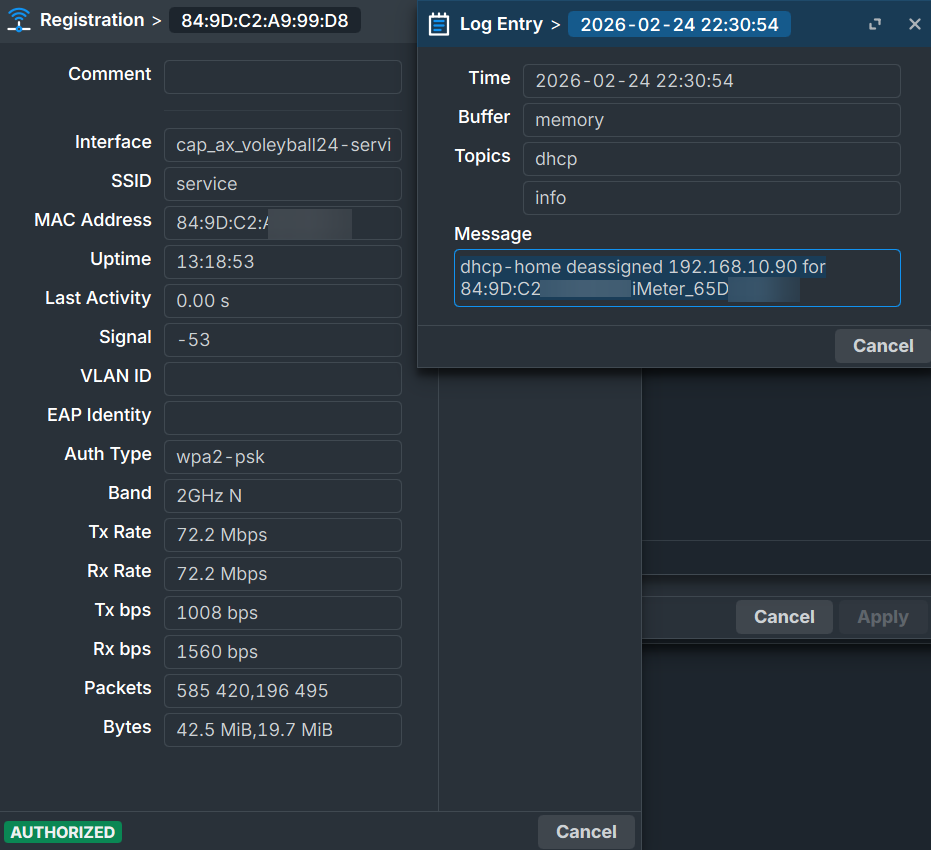

If it has issue with dhcp server ,does it means the device will stop upload data untill this issue are resolved by you manually?
Has router or the dhcp server changed recently?
If it is stable for about half an year, but happen issue freqeuently recently ,some on-site factors also need to be concerned.
Ex: the clients is more than the AP can be afford.
Do you have another dhcp server can be tested?
Do you mind reboot the router and check whether the connection will be stable for a period of time?
let me summarize,
1 you use Ver 91.061 for 6 months and it is OK.
2 the issue happen since Jan 29th, but you do not change the firmware.
3 you upgrade the firmware to 91.063, but issue still exist
Yes?

Try setting the meter's IP address to "Make Static" and see if the meter still disconnects.
1. Yes, but before 91.061 until September i used last available version (don't remember which exactly).
2. Yes, at least in the notification history, disconnections often started appearing around January 29.
3. Yes.
I also changed DHCP lease time from 10min to 1 day at 25 February, but this did not help.
I'll try changing the IP to static on the meter now and see what happens, but I suspect it's unlikely to help.
Unfortunately, there is no other DHCP server. The number of clients definitely does not exceed this, as the core of the network is Mikrotik RB5009, and iammeter connects to the CAP AX point, which has about 5 other clients besides it. I tried restarting, of course, and as for changes, I don't think I can remember exactly. RouterOS 7.21.2 was released on January 29, but I almost never update immediately; I wait at least 5 days, so I don't think the changes were made during the period when the problems began. About 2 hours ago, I set a static address on iammeter, and so far there have been no disconnections. I will observe it for a while and give my answer in 1-2 days.
Also, I accidentally marked the previous message as the best answer. I'll change it later when we fully understand the problem.
If the time of this issue start with a time that your routerOS push upgrade, it is very suspicious.
At first, I also thought the problem was caused by the update, but then I looked at the release dates of the RouterOS updates, compared them with the date when the problematic logs began, and realized that the problem started earlier.
Or can you try to downward the routerOS for a simple testing either?
Unfortunately, downgrading RouterOS won't work in my case. But what I've noticed is that a day has passed since I assigned a static IP to iammeter, and so far Home Assistant hasn't lost connection with it.
I'll observe it a little longer and try to revert to DHCP tomorrow or the day after. It's strange that such problems have arisen, as none of the other IoT devices are disconnecting. Each device has a static IP address bound to its MAC address in the Mikrotik DHCP server itself.
So, I switched back to DHCP, observed it for a couple of days, and the problem returned. Why could problems with DHCP have started? Moreover, IAMMETER does not even reboot, the run time is not reset—it just disconnects and reconnects. For now, I will revert to a static address and wait for the next RouterOS update, but this is quite strange.
How offen does this routeOS upgrade per year?
If it did not upgrade frequently ,but this issue happen around the time points of the latest upgrade .
It is high possiblity that this issue related to the upgrade.
Around twice in month, you can see it on the https://mikrotik.com/download/changelogs?channelFilter=stable,
After switching to DHCP, I set a static address again, and this time the problems returned. Strange...
The issue must return, as we do not change anything.
As it can be trigger is clear, I think that means easier sorted.
I think the quickest mthod is downward to one of the version of the Router OS before and check whether this issue is still there.
It the downward is difficult,let us wait for the next upgrading.
I updated to version 7.22, but the problem persists. What’s more, it seems that because I set a static IP address, the router suddenly shut down and won’t reconnect, nor is it providing a Wi-Fi hotspot. Is there anything I can do without completely powering down the network?
Let me summarize
1 the device work stable for about half a year.
2 This networking issue (IP of the meter is not stable in dhcp mode,) happen around the time points that the router OS upgrade.
3 when you set stataic ip on energy meter ,this issue disappear. But when you use dhcp ,this issue reappear.
4 you used the static ip mode until the next Router OS upgrading recently.
5 you find the issue still exist in dhcp mode after the routerOS upgrading to the next version.
6 Then you set the static ip on the meter and found the router is totally down.
Does I summarize corrct?
If so ,I do not think this issue related to the meter.
I can not image any possibilities that a static ip client can affect the router.
If you like to investigate ,you can install a wireshark and analyze the wifi data of the meter(or use a openwrt or such opensurece router that can run tcpdump directly)).
Or you this above suggestion is too complicated, you can use a simple router work with this meter can check whether this issue still exist.