
Wi-Fi problems since upgrading to latest FW
Since upgrading to the latest FW, I am experiencing Wi-Fi issues. Either the meter enters AP mode or the Wi-Fi is super slow.
I have several Access Points which span Wi-Fi networts with the same SSID. Network devices are supposed to roam to the one with the best RSSI, see multiple Heimnetz networks: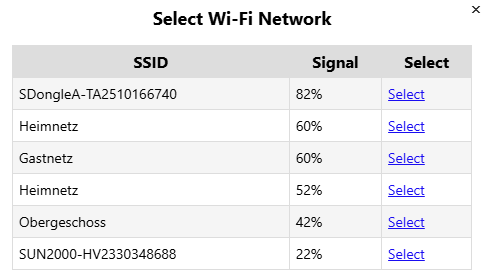
This is with opened meter cabinet. With the cabinet being closed, the difference in signal strength is even larger.
It looks like the meter keeps connecting to the worse AP...
... even though I initially connected to the better one.
Why is that? Is it somehow possible to force an AP via its BSSID?

Have you meet this issue only in this version.
Normally, this part logic will not changed in code.
Whether the previous version also have the similar issue?
If not ,please let me know the previous firmware version you have used.We will check the code differnce.
It started only recently. And it started with the update I did some days ago. I am frequently getting the Meter Offline Alert.
May it be due to the FW not doing a daily restart anymore? Maybe the Wi-Fi module isn't super stable longterm?
I don't know anymore from which version I updated to i.91.063T2 but I skipped quite some versions. Think it was i.76.058.8.
Or maybe I connected to the wrong AP after the update? Can you show the BSSID in the UI?
Hi,
we have tested and confirm it will connect to the proper AP (best signal) after reboot.
Hmm. No clue. All I can say is that I have connectivity issues after the update.
Now I can't see the meter on either AP. It also does not seem to be in AP mode itself. Can't find it via iPhone. The WIFI LED on the device is solid red. After opening the meter cabinet, the meter appeared again in the device list of the closer AP but I still can't access it via its IP (website not available).
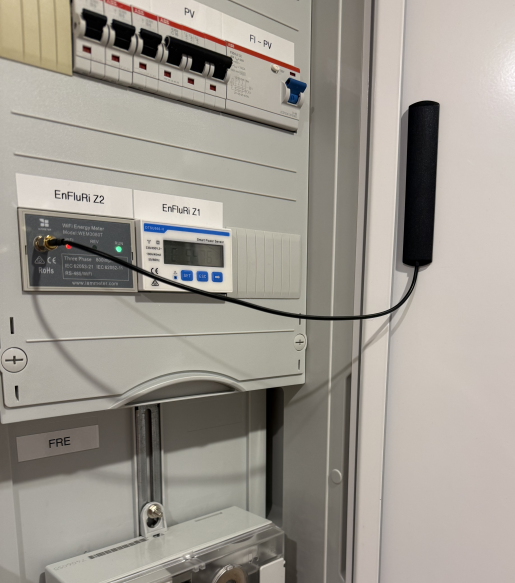
I know the cabinet is shielding quite a bit. But it has never been a problem before the update. Probably the daily reboot previously fixed something?
It looks like there has also been a big FW update to my internet router closer to the WEM3080T. I now tried to connect to that one manually but it does not seem to do so. If I try that, the WEM3080T comes up in AP mode. So it looks like a compatibility issue with the internet router (Vodafone Station with Broadcom chipset)!?
I now disabled WPA3 in the router. Seems to be connecting for now.
Signal in the cabinet is indeed quite weak. But I never had a problem in years. It only started recently.
Wi-Fi channels of the two APs are non-interfering (CH1 & CH6). No nearby Wi-Fi networks that interfere with them.
When the WEM3080T enters AP mode, it means the device has completely lost its connection to the configured access point (AP).
Based on your description, it appears that the AP itself may not be stable. When you attempt to connect to it, the AP may reboot or enter an abnormal state, which causes the WEM3080T to lose the connection entirely.
Below is the Wi-Fi reconnection logic of the WEM3080T:
If the WEM3080T is configured to connect to a specific AP and there are multiple APs broadcasting the same SSID, the WEM3080T will always try to connect to the originally configured AP, regardless of signal strength.
If the configured AP becomes unavailable (i.e., the WEM3080T cannot connect to it at all), the WEM3080T will then automatically switch to another AP with the same SSID that has a stronger signal.
Thanks for the info.
After disabling WPA3 in the AP, connection looks stable. Are WPA3 problems still a thing?
Hmmm, accessing the meter again turned super slow. It is still connected to the closer AP. So it did not connect to the other. Looks like AP and meter don't like each other too much anymore.
I can only find one Heimnetz network now:
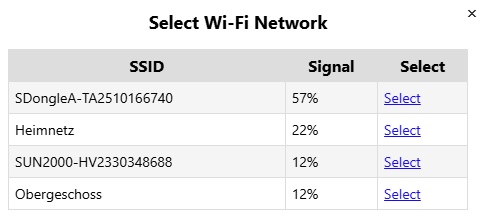
Probably indeed a signal issue? Will probably buy an SMA extension and put the antenna outside of the cabinet.
If the Wi-Fi signal strength is only 22%, the device may not be able to communicate reliably, so the slow response can be explained.
I assume this scan result was obtained after you closed the cabinet, correct? If so, the signal strength does appear to be too weak.
In previous firmware versions, when WPA3 was not supported, if the access point was encrypted with WPA3, the energy meter could not connect to it at all and would remain in AP mode (you would see an SSID like iMeter_xxx).
My guess is that WPA3 requires a stronger and more stable signal due to its more complex communication mechanism. This could explain why the communication became stable after you disabled WPA3, or before you upgraded the firmware (although it was still slow).
If possible, please try keeping the cabinet open, as the signal strength then looks sufficient. Then test whether the communication remains stable under this condition.
It certainly looks like a signal problem. I wonder why everything worked well for over two years. Something must have changed, probably with the big router/AP update. I will again check the spectrum for interference and may try to force the basement router (where the WEM is supposed to be on) on CH1 and the upper floor router on CH6, effectively switching channels.
I am also thinking about extending the SMA cable and placing the antenna outside of the cabinet.
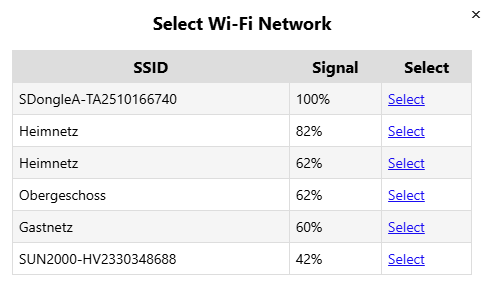
My older son, who lives in the basement, told me that he also recently started to have Wi-Fi issues. So I guess it is connected to the internet router update. I now removed the cabinet door which of course dramatically improved signal strength:
Guess I will disable the internet router's Wi-Fi and install another AP in a better place in the basement.
I guess the signal weak+ wpa3 (need more handshake communication) enable make this issue.