

Bridge the energy meter by Waveshare (RS485_TO_ETH) DTU to Home Assistant
Preface
Wiring
RS485_TO_ETH Configuration
Home Assistant Configuration
Preface
Wiring:
_WEM3046T.jpg)
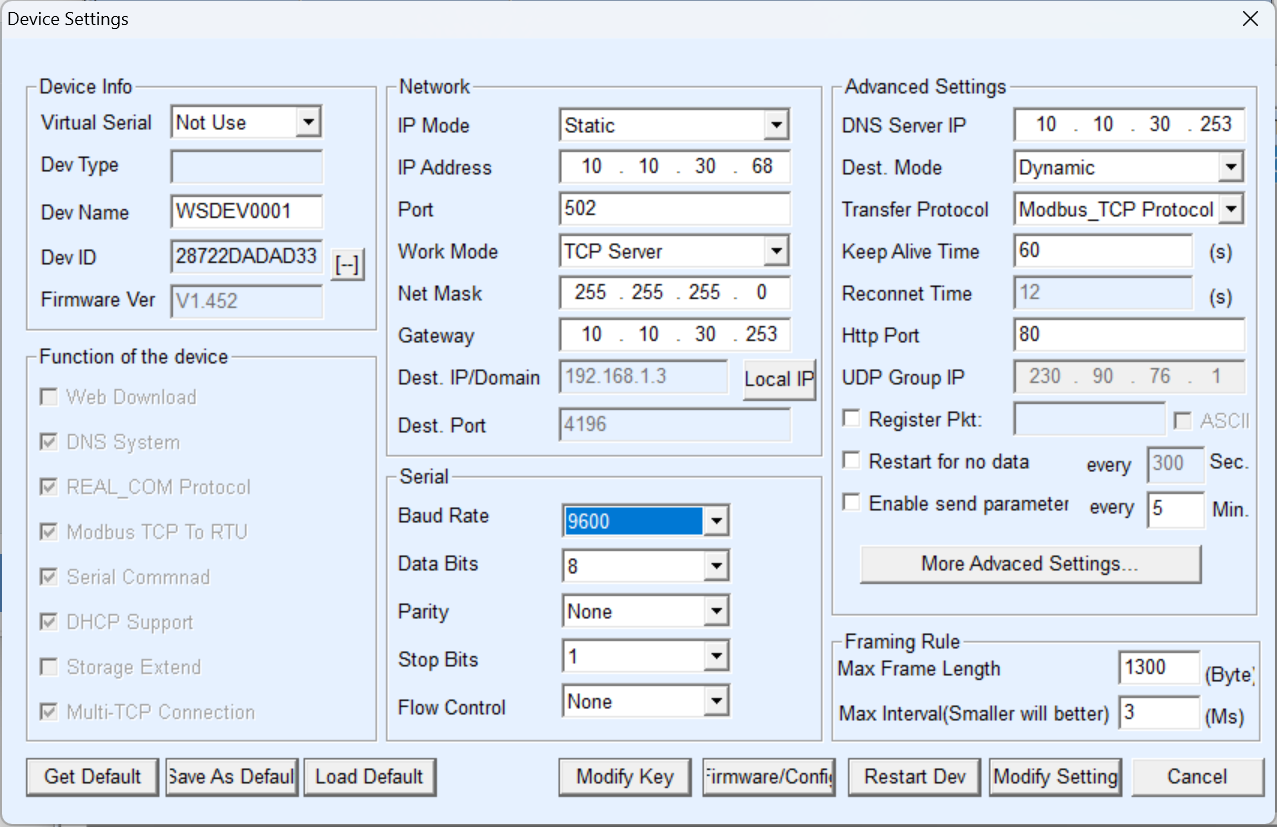
RS485_TO_ETH Configuration:
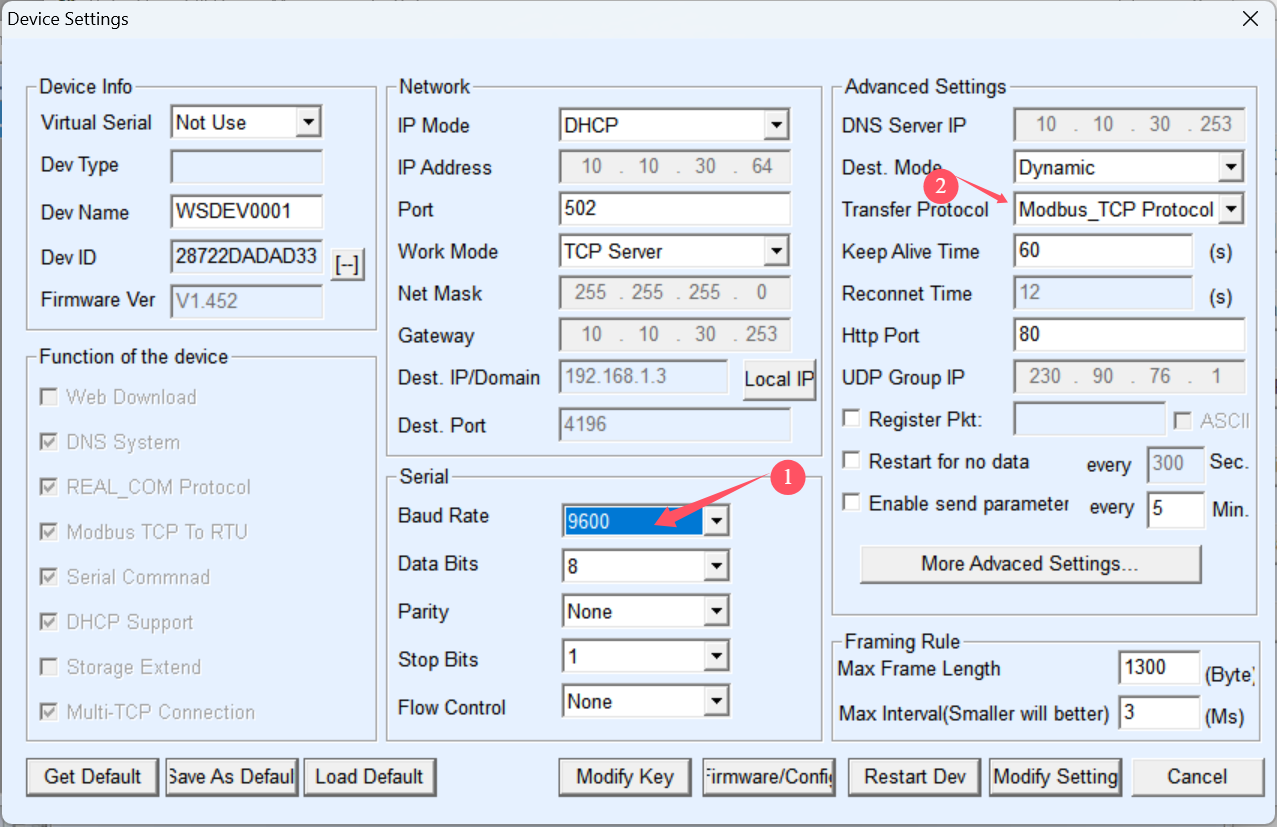
Serial
Baud Rate: 9600
Advanced Settings
Transfer Protocol: Modbus_TCP Protocol
Then Modify Setting
Home Assistant Configuration:
Add modbustcp_waveshare.yaml to Home Assistant
modbus:
  - name: hub1
    type: tcp
    host: 10.10.30.64
    port: 502
    sensors:
      - name: Modbus_Voltage_A
        slave: 1
        address: 0x48
        input_type: holding
        unit_of_measurement: V
        device_class: voltage
        state_class: measurement
        scale: 0.01
        offset: 0
        precision: 1
        data_type: uint16
      - name: Modbus_Current_A
        slave: 1
        address: 0x49
        input_type: holding
        unit_of_measurement: A
        device_class: current
        state_class: measurement
        scale: 0.001
        offset: 0
        precision: 3
        data_type: uint16
      - name: Modbus_Power_A
        slave: 1
        address: 0x7A
        input_type: holding
        unit_of_measurement: W
        device_class: power
        state_class: measurement
        scale: 0.1
        offset: 0
        precision: 1
        data_type: int32
      - name: Modbus_ImportEnergy_A
        slave: 1
        address: 0x68
        input_type: holding
        unit_of_measurement: kWh
        device_class: energy
        state_class: total_increasing
        scale: 0.001
        offset: 0
        precision: 3
        data_type: uint32
      - name: Modbus_ExportGrid_A
        slave: 1
        address: 0x6A
        input_type: holding
        unit_of_measurement: kWh
        device_class: energy
        state_class: total_increasing
        scale: 0.001
        offset: 0
        precision: 3
        data_type: uint32
      - name: Modbus_PF_A
        slave: 1
        address: 0x4D
        input_type: holding
        #unit_of_measurement: '%'
        device_class: power_factor
        state_class: measurement
        scale: 0.001
        offset: 0
        precision: 2
        data_type: uint16

      - name: Modbus_Voltage_B
        slave: 1
        address: 0x51
        input_type: holding
        unit_of_measurement: V
        device_class: voltage
        state_class: measurement
        scale: 0.01
        offset: 0
        precision: 1
        data_type: uint16
      - name: Modbus_Current_B
        slave: 1
        address: 0x52
        input_type: holding
        unit_of_measurement: A
        device_class: current
        state_class: measurement
        scale: 0.001
        offset: 0
        precision: 3
        data_type: uint16
      - name: Modbus_Power_B
        slave: 1
        address: 0x7C
        input_type: holding
        unit_of_measurement: W
        device_class: power
        state_class: measurement
        scale: 0.1
        offset: 0
        precision: 1
        data_type: int32
      - name: Modbus_ImportEnergy_B
        slave: 1
        address: 0x6C
        input_type: holding
        unit_of_measurement: kWh
        device_class: energy
        state_class: total_increasing
        scale: 0.001
        offset: 0
        precision: 3
        data_type: uint32
      - name: Modbus_ExportGrid_B
        slave: 1
        address: 0x6E
        input_type: holding
        unit_of_measurement: kWh
        device_class: energy
        state_class: total_increasing
        scale: 0.001
        offset: 0
        precision: 3
        data_type: uint32
      - name: Modbus_PF_B
        slave: 1
        address: 0x56
        input_type: holding
        #unit_of_measurement: '%'
        device_class: power_factor
        state_class: measurement
        scale: 0.001
        offset: 0
        precision: 2
        data_type: uint16

      - name: Modbus_Voltage_C
        slave: 1
        address: 0x5A
        input_type: holding
        unit_of_measurement: V
        device_class: voltage
        state_class: measurement
        scale: 0.01
        offset: 0
        precision: 1
        data_type: uint16
      - name: Modbus_Current_C
        slave: 1
        address: 0x5B
        input_type: holding
        unit_of_measurement: A
        device_class: current
        state_class: measurement
        scale: 0.001
        offset: 0
        precision: 3
        data_type: uint16
      - name: Modbus_Power_C
        slave: 1
        address: 0x7E
        input_type: holding
        unit_of_measurement: W
        device_class: power
        state_class: measurement
        scale: 0.1
        offset: 0
        precision: 1
        data_type: int32
      - name: Modbus_ImportEnergy_C
        slave: 1
        address: 0x70
        input_type: holding
        unit_of_measurement: kWh
        device_class: energy
        state_class: total_increasing
        scale: 0.001
        offset: 0
        precision: 3
        data_type: uint32
      - name: Modbus_ExportGrid_C
        slave: 1
        address: 0x72
        input_type: holding
        unit_of_measurement: kWh
        device_class: energy
        state_class: total_increasing
        scale: 0.001
        offset: 0
        precision: 3
        data_type: uint32
      - name: Modbus_PF_C
        slave: 1
        address: 0x5F
        input_type: holding
        #unit_of_measurement: '%'
        device_class: power_factor
        state_class: measurement
        scale: 0.001
        offset: 0
        precision: 2
        data_type: uint16

      - name: Modbus_Frequency
        slave: 1
        address: 0x65
        input_type: holding
        unit_of_measurement: Hz
        device_class: frequency
        state_class: measurement
        scale: 0.01
        offset: 0
        precision: 1
        data_type: uint16

      - name: Modbus_Power_SUM
        slave: 1
        address: 0x78
        input_type: holding
        unit_of_measurement: W
        device_class: power
        state_class: measurement
        scale: 0.1
        offset: 0
        precision: 1
        data_type: int32
      - name: Modbus_ImportEnergy_SUM
        slave: 1
        address: 0x63
        input_type: holding
        unit_of_measurement: kWh
        device_class: energy
        state_class: total_increasing
        scale: 0.00125
        offset: 0
        precision: 3
        data_type: uint32
      - name: Modbus_ExportGrid_SUM
        slave: 1
        address: 0x66
        input_type: holding
        unit_of_measurement: kWh
        device_class: energy
        state_class: total_increasing
        scale: 0.00125
        offset: 0
        precision: 3
        data_type: uint32

      - name: Modbus_ReactivePower_A
        slave: 1
        address: 0x80
        input_type: holding
        unit_of_measurement: var
        device_class: reactive_power
        state_class: measurement
        scale: 0.1
        offset: 0
        precision: 1
        data_type: int32
      - name: Modbus_ReactivePower_B
        slave: 1
        address: 0x82
        input_type: holding
        unit_of_measurement: var
        device_class: reactive_power
        state_class: measurement
        scale: 0.1
        offset: 0
        precision: 1
        data_type: int32
      - name: Modbus_ReactivePower_C
        slave: 1
        address: 0x84
        input_type: holding
        unit_of_measurement: var
        device_class: reactive_power
        state_class: measurement
        scale: 0.1
        offset: 0
        precision: 1
        data_type: int32

      - name: Modbus_ReactiveEnergy_A_Forward
        slave: 1
        address: 0x86
        input_type: holding
        unit_of_measurement: kvarh
        device_class: energy
        state_class: total_increasing
        scale: 0.001
        offset: 0
        precision: 3
        data_type: uint32
      - name: Modbus_ReactiveEnergy_A_Reverse
        slave: 1
        address: 0x88
        input_type: holding
        unit_of_measurement: kvarh
        device_class: energy
        state_class: total_increasing
        scale: 0.001
        offset: 0
        precision: 3
        data_type: uint32
      - name: Modbus_ReactiveEnergy_B_Forward
        slave: 1
        address: 0x8A
        input_type: holding
        unit_of_measurement: kvarh
        device_class: energy
        state_class: total_increasing
        scale: 0.001
        offset: 0
        precision: 3
        data_type: uint32
      - name: Modbus_ReactiveEnergy_B_Reverse
        slave: 1
        address: 0x8C
        input_type: holding
        unit_of_measurement: kvarh
        device_class: energy
        state_class: total_increasing
        scale: 0.001
        offset: 0
        precision: 3
        data_type: uint32
      - name: Modbus_ReactiveEnergy_C_Forward
        slave: 1
        address: 0x8E
        input_type: holding
        unit_of_measurement: kvarh
        device_class: energy
        state_class: total_increasing
        scale: 0.001
        offset: 0
        precision: 3
        data_type: uint32
      - name: Modbus_ReactiveEnergy_C_Reverse
        slave: 1
        address: 0x90
        input_type: holding
        unit_of_measurement: kvarh
        device_class: energy
        state_class: total_increasing
        scale: 0.001
        offset: 0
        precision: 3
        data_type: uint32
How do I set the calibration of the CTs? Is it the scale: value under each current sensor? If so would a 400/5 sensor have a scale of 0.0125?
Also when using the settings above but changed to my IP address I get the following error message
Logger: homeassistant.config
Source: config.py:939
First occurred: 11:01:31 AM (1 occurrence)
Last logged: 11:01:31 AM
Invalid config for 'modbus' at configuration.yaml, line 21: required key 'baudrate' not provided, please check the docs at https://www.home-assistant.io/integrations/modbus Invalid config for 'modbus' at configuration.yaml, line 21: required key 'bytesize' not provided, please check the docs at https://www.home-assistant.io/integrations/modbus Invalid config for 'modbus' at configuration.yaml, line 21: required key 'method' not provided, please check the docs at https://www.home-assistant.io/integrations/modbus Invalid config for 'modbus' at configuration.yaml, line 21: required key 'parity' not provided, please check the docs at https://www.home-assistant.io/integrations/modbus Invalid config for 'modbus' at configuration.yaml, line 21: required key 'port' not provided, please check the docs at https://www.home-assistant.io/integrations/modbus Invalid config for 'modbus' at configuration.yaml, line 21: required key 'stopbits' not provided, please check the docs at https://www.home-assistant.io/integrations/modbus Invalid config for 'modbus' at configuration.yaml, line 21: required key 'type' not provided, please check the docs at https://www.home-assistant.io/integrations/modbus
However I'm using an ethernet to RS485 gateway and the baudrate and bytesize are set there not in Home assistant

The Modbus section in your configuration.yaml file likely has a syntax error or is incomplete. Please paste your YAML configuration file.
It's literally cut and paste from your example above but with the IP address changed
Why does the voltage sensor need to be scaled to the CT ratio? It shouldn't care what the CT is for measuring voltage. Please confirm
If you are using a 400/5 ratio CT, then the scales of sensors (current, power, importenergy, exportgrid, XX_sum, reactiveXX) all need to be multiplied by 400/5. For example, if Modbus_Current_A originally had a scale of 0.001, then the current scale is 0.001 x (400/5) = 0.08; if Modbus_ImportEnergy_A originally had a scale of 0.001, then the current scale is 0.001 x (400/5) = 0.08.
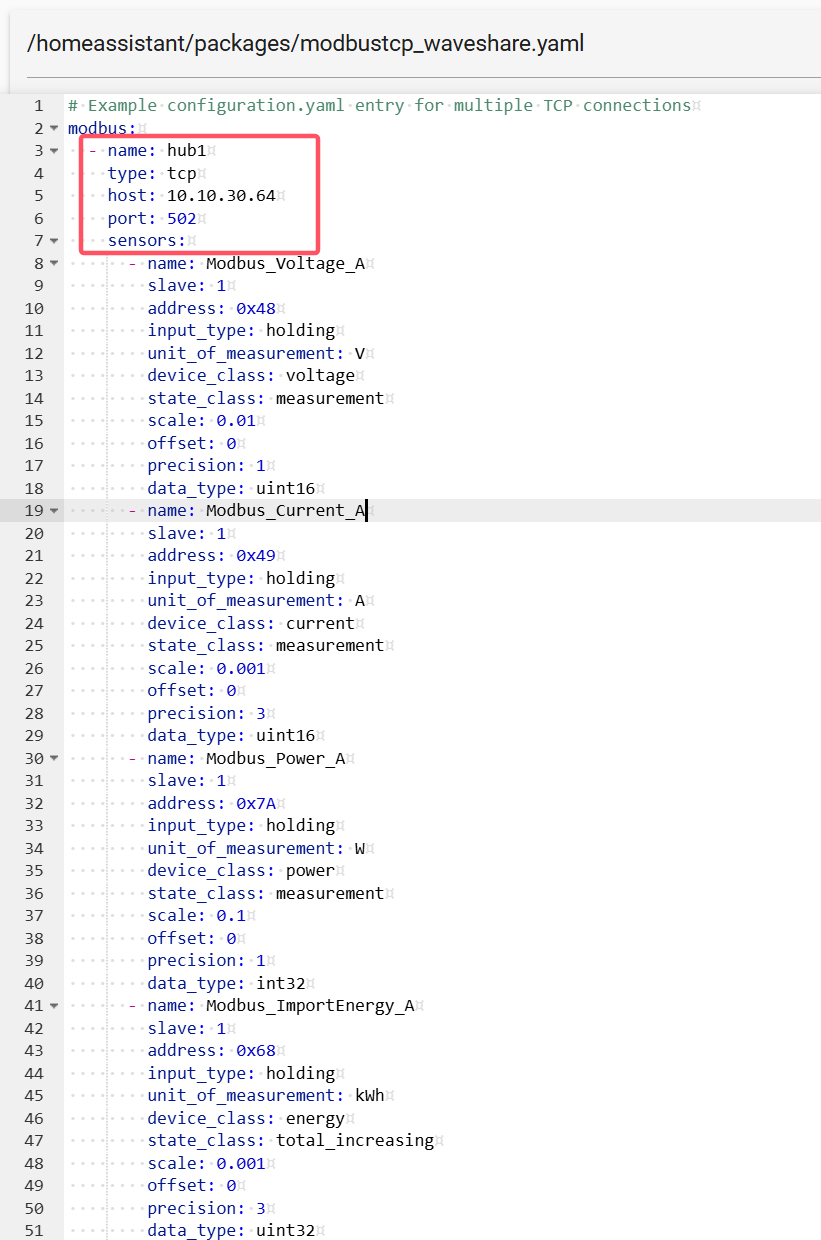
# Loads default set of integrations. Do not remove.
default_config:
# Load frontend themes from the themes folder
frontend:
themes: !include_dir_merge_named themes
automation: !include automations.yaml
script: !include scripts.yaml
scene: !include scenes.yaml
#Power meter sensors configured in file sensors.yaml. Kept seperate to reduce clutter here.
#sensor: !include sensors.yaml
#sensor: !include sensors.yaml
# - platform: iammeter
# host: 10.88.88.223
# name: "B4_Bus_A5"
modbus:
- name: "B4_A5_Busway"
- platform: iammeter
type: tcp
host: 192.168.146.151
port: 502
sensors:
- name: Modbus_Voltage_A
slave: 1
address: 0x48
input_type: holding
unit_of_measurement: V
device_class: voltage
state_class: measurement
scale: 0.01
offset: 0
precision: 1
data_type: uint16
- name: Modbus_Current_A
slave: 1
address: 0x49
input_type: holding
unit_of_measurement: A
device_class: current
state_class: measurement
scale: 0.001
offset: 0
precision: 3
data_type: uint16
- name: Modbus_Power_A
slave: 1
address: 0x7A
input_type: holding
unit_of_measurement: W
device_class: power
state_class: measurement
scale: 0.1
offset: 0
precision: 1
data_type: int32
- name: Modbus_ImportEnergy_A
slave: 1
address: 0x68
input_type: holding
unit_of_measurement: kWh
device_class: energy
state_class: total_increasing
scale: 0.001
offset: 0
precision: 3
data_type: uint32
- name: Modbus_ExportGrid_A
slave: 1
address: 0x6A
input_type: holding
unit_of_measurement: kWh
device_class: energy
state_class: total_increasing
scale: 0.001
offset: 0
precision: 3
data_type: uint32
- name: Modbus_PF_A
slave: 1
address: 0x4D
input_type: holding
#unit_of_measurement: '%'
device_class: power_factor
state_class: measurement
scale: 0.001
offset: 0
precision: 2
data_type: uint16
- name: Modbus_Voltage_B
slave: 1
address: 0x51
input_type: holding
unit_of_measurement: V
device_class: voltage
state_class: measurement
scale: 0.01
offset: 0
precision: 1
data_type: uint16
- name: Modbus_Current_B
slave: 1
address: 0x52
input_type: holding
unit_of_measurement: A
device_class: current
state_class: measurement
scale: 0.001
offset: 0
precision: 3
data_type: uint16
- name: Modbus_Power_B
slave: 1
address: 0x7C
input_type: holding
unit_of_measurement: W
device_class: power
state_class: measurement
scale: 0.1
offset: 0
precision: 1
data_type: int32
- name: Modbus_ImportEnergy_B
slave: 1
address: 0x6C
input_type: holding
unit_of_measurement: kWh
device_class: energy
state_class: total_increasing
scale: 0.001
offset: 0
precision: 3
data_type: uint32
- name: Modbus_ExportGrid_B
slave: 1
address: 0x6E
input_type: holding
unit_of_measurement: kWh
device_class: energy
state_class: total_increasing
scale: 0.001
offset: 0
precision: 3
data_type: uint32
- name: Modbus_PF_B
slave: 1
address: 0x56
input_type: holding
#unit_of_measurement: '%'
device_class: power_factor
state_class: measurement
scale: 0.001
offset: 0
precision: 2
data_type: uint16
- name: Modbus_Voltage_C
slave: 1
address: 0x5A
input_type: holding
unit_of_measurement: V
device_class: voltage
state_class: measurement
scale: 0.01
offset: 0
precision: 1
data_type: uint16
- name: Modbus_Current_C
slave: 1
address: 0x5B
input_type: holding
unit_of_measurement: A
device_class: current
state_class: measurement
scale: 0.001
offset: 0
precision: 3
data_type: uint16
- name: Modbus_Power_C
slave: 1
address: 0x7E
input_type: holding
unit_of_measurement: W
device_class: power
state_class: measurement
scale: 0.1
offset: 0
precision: 1
data_type: int32
- name: Modbus_ImportEnergy_C
slave: 1
address: 0x70
input_type: holding
unit_of_measurement: kWh
device_class: energy
state_class: total_increasing
scale: 0.001
offset: 0
precision: 3
data_type: uint32
- name: Modbus_ExportGrid_C
slave: 1
address: 0x72
input_type: holding
unit_of_measurement: kWh
device_class: energy
state_class: total_increasing
scale: 0.001
offset: 0
precision: 3
data_type: uint32
- name: Modbus_PF_C
slave: 1
address: 0x5F
input_type: holding
#unit_of_measurement: '%'
device_class: power_factor
state_class: measurement
scale: 0.001
offset: 0
precision: 2
data_type: uint16
- name: Modbus_Frequency
slave: 1
address: 0x65
input_type: holding
unit_of_measurement: Hz
device_class: frequency
state_class: measurement
scale: 0.01
offset: 0
precision: 1
data_type: uint16
- name: Modbus_Power_SUM
slave: 1
address: 0x78
input_type: holding
unit_of_measurement: W
device_class: power
state_class: measurement
scale: 0.1
offset: 0
precision: 1
data_type: int32
- name: Modbus_ImportEnergy_SUM
slave: 1
address: 0x63
input_type: holding
unit_of_measurement: kWh
device_class: energy
state_class: total_increasing
scale: 0.00125
offset: 0
precision: 3
data_type: uint32
- name: Modbus_ExportGrid_SUM
slave: 1
address: 0x66
input_type: holding
unit_of_measurement: kWh
device_class: energy
state_class: total_increasing
scale: 0.00125
offset: 0
precision: 3
data_type: uint32
- name: Modbus_ReactivePower_A
slave: 1
address: 0x80
input_type: holding
unit_of_measurement: var
device_class: reactive_power
state_class: measurement
scale: 0.1
offset: 0
precision: 1
data_type: int32
- name: Modbus_ReactivePower_B
slave: 1
address: 0x82
input_type: holding
unit_of_measurement: var
device_class: reactive_power
state_class: measurement
scale: 0.1
offset: 0
precision: 1
data_type: int32
- name: Modbus_ReactivePower_C
slave: 1
address: 0x84
input_type: holding
unit_of_measurement: var
device_class: reactive_power
state_class: measurement
scale: 0.1
offset: 0
precision: 1
data_type: int32
- name: Modbus_ReactiveEnergy_A_Forward
slave: 1
address: 0x86
input_type: holding
unit_of_measurement: kvarh
device_class: energy
state_class: total_increasing
scale: 0.001
offset: 0
precision: 3
data_type: uint32
- name: Modbus_ReactiveEnergy_A_Reverse
slave: 1
address: 0x88
input_type: holding
unit_of_measurement: kvarh
device_class: energy
state_class: total_increasing
scale: 0.001
offset: 0
precision: 3
data_type: uint32
- name: Modbus_ReactiveEnergy_B_Forward
slave: 1
address: 0x8A
input_type: holding
unit_of_measurement: kvarh
device_class: energy
state_class: total_increasing
scale: 0.001
offset: 0
precision: 3
data_type: uint32
- name: Modbus_ReactiveEnergy_B_Reverse
slave: 1
address: 0x8C
input_type: holding
unit_of_measurement: kvarh
device_class: energy
state_class: total_increasing
scale: 0.001
offset: 0
precision: 3
data_type: uint32
- name: Modbus_ReactiveEnergy_C_Forward
slave: 1
address: 0x8E
input_type: holding
unit_of_measurement: kvarh
device_class: energy
state_class: total_increasing
scale: 0.001
offset: 0
precision: 3
data_type: uint32
- name: Modbus_ReactiveEnergy_C_Reverse
slave: 1
address: 0x90
input_type: holding
unit_of_measurement: kvarh
device_class: energy
state_class: total_increasing
scale: 0.001
offset: 0
precision: 3
data_type: uint32
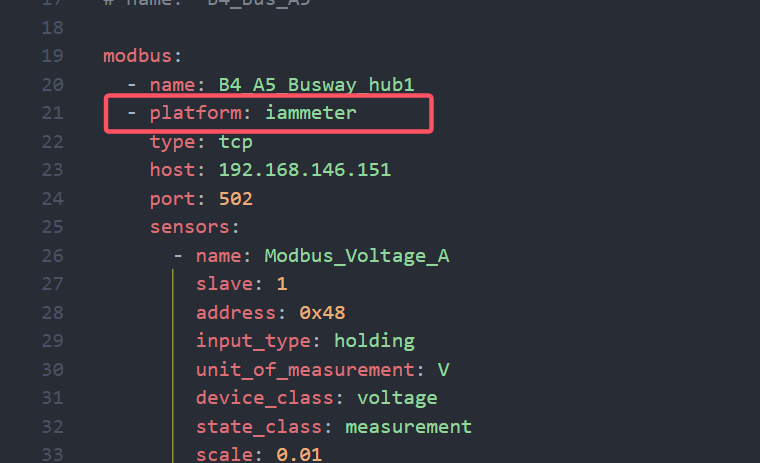
You can refer to this; this is the configuration I modified according to your settings, 400/5.

OK good news is, removing the platform now allows the Entities to be created in home assistant. I forgot I added that line in there when it failed a previous time for not having a platform line.
However there's no data populated into any of the fields. How can I verify its actually talking to the meter?
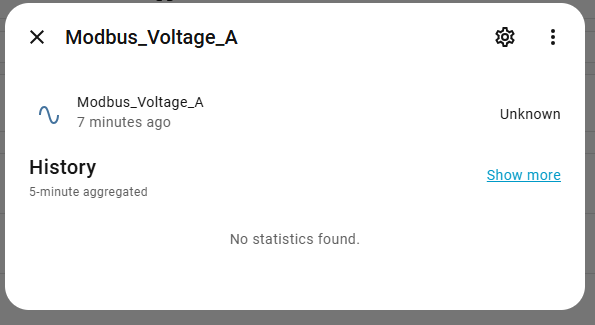
Also the name I gave the unit in the configuration.yaml doesn't come through on the Entities list. Is there a way to carry that forward without renaming every sensor line in the list? I'm planning to use 81 of these meters and really need a good way to tell them apart.
Thanks for the scale mod table. That's very clear now.
Please check if your RS485_TO_ETH is configured according to this diagram.
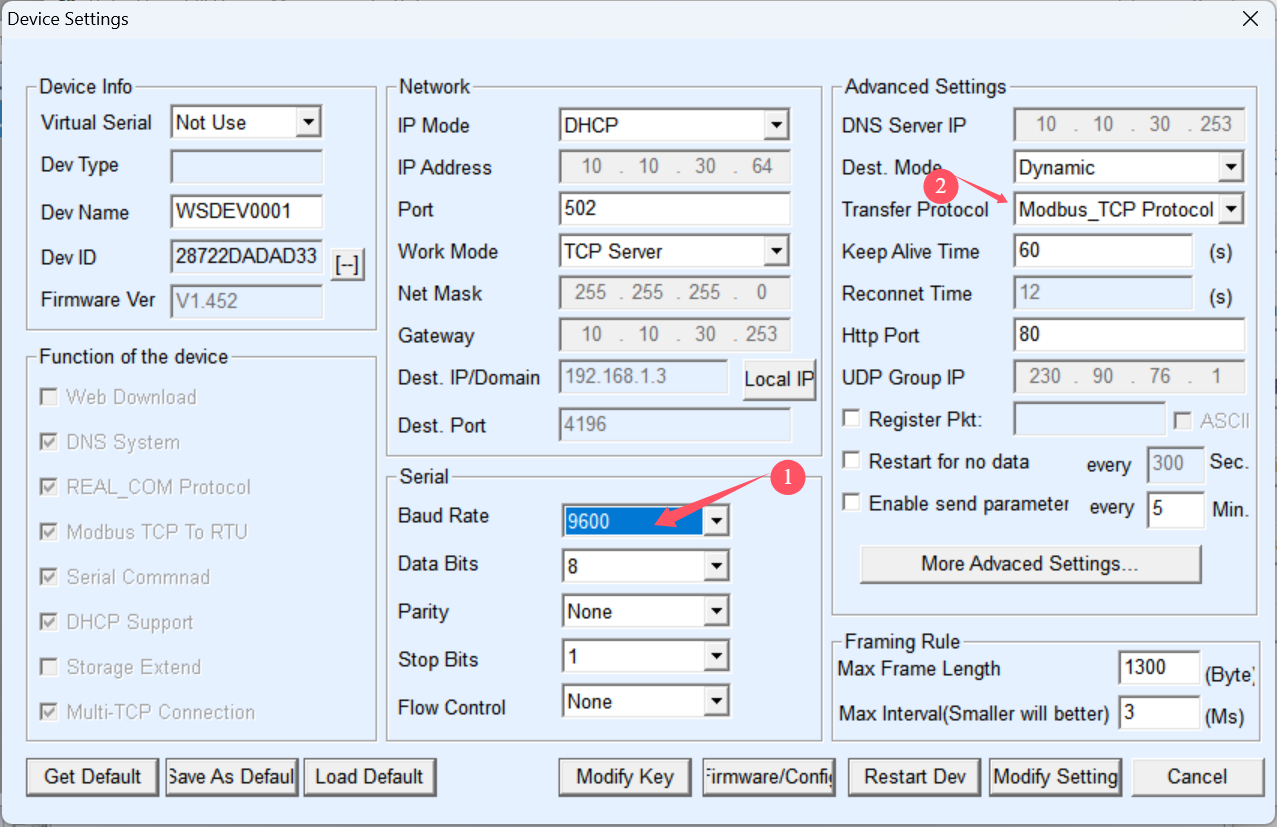
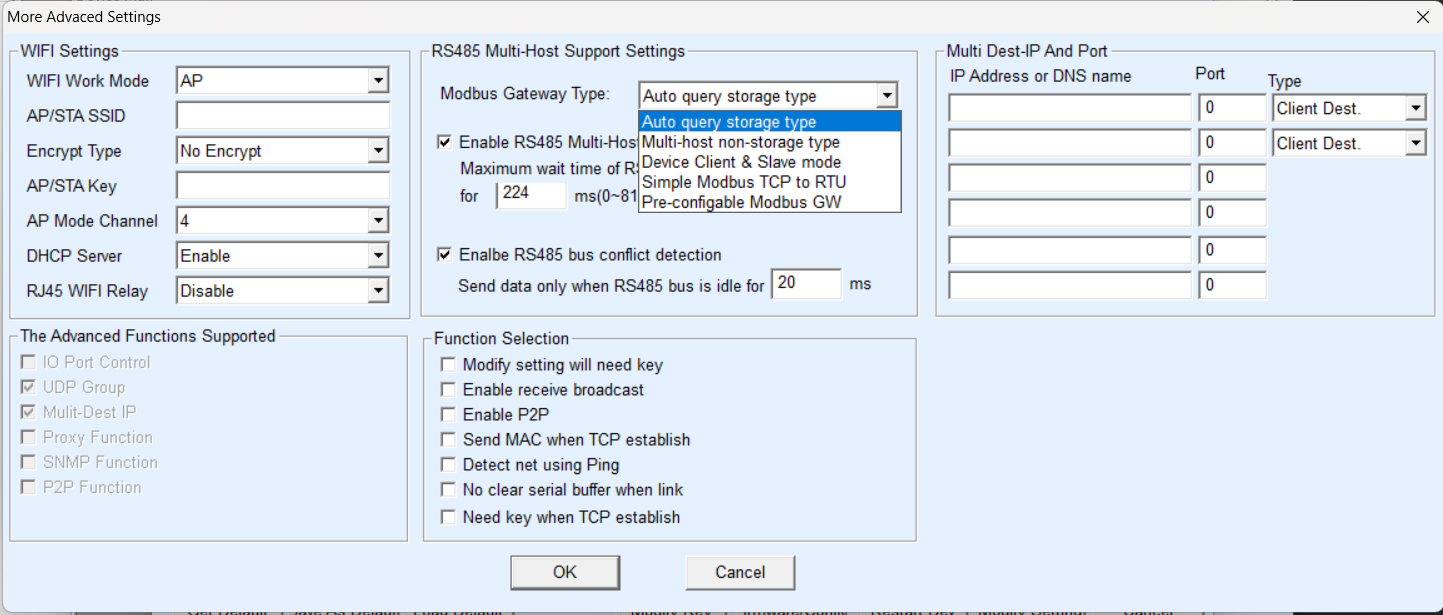
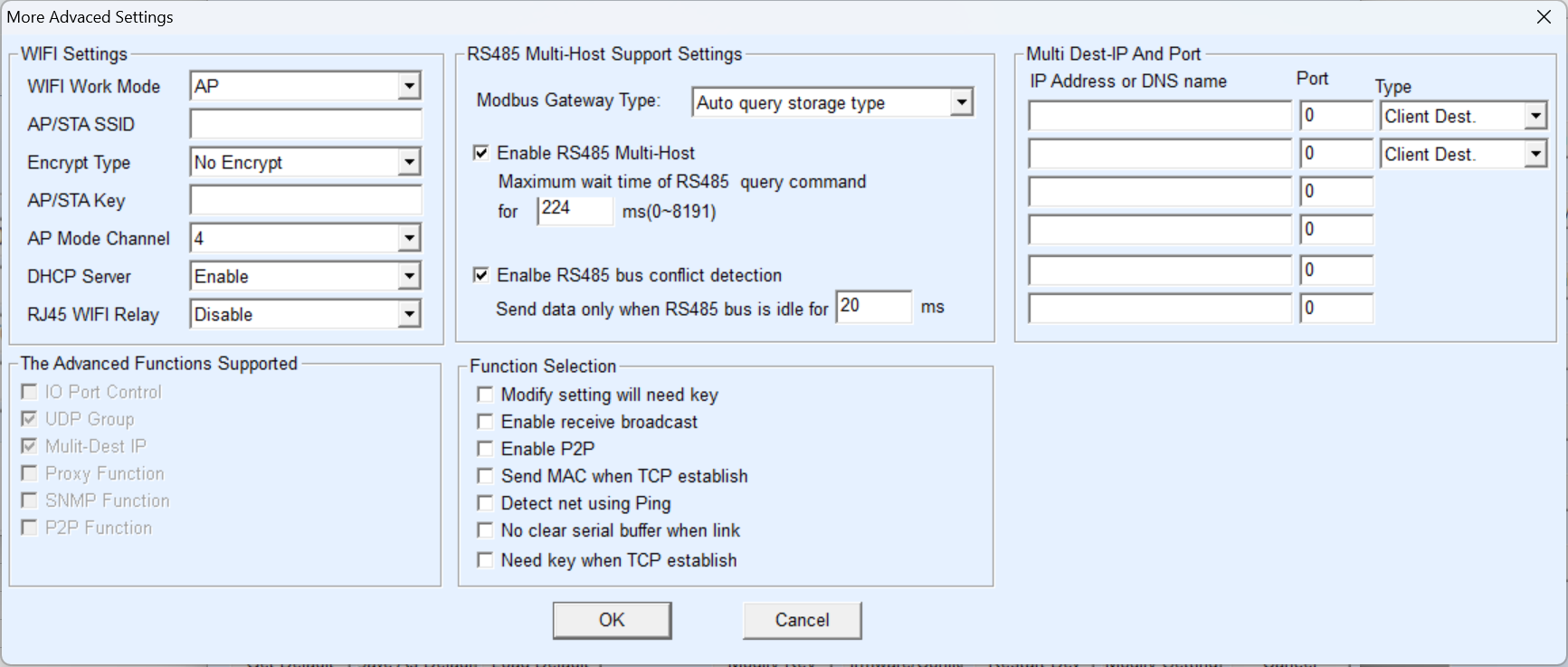
It is, How about the More Advanced Settings? It's currently set to interview the device for modbus type but should I set it to the Simple TCP or one of the other settings?
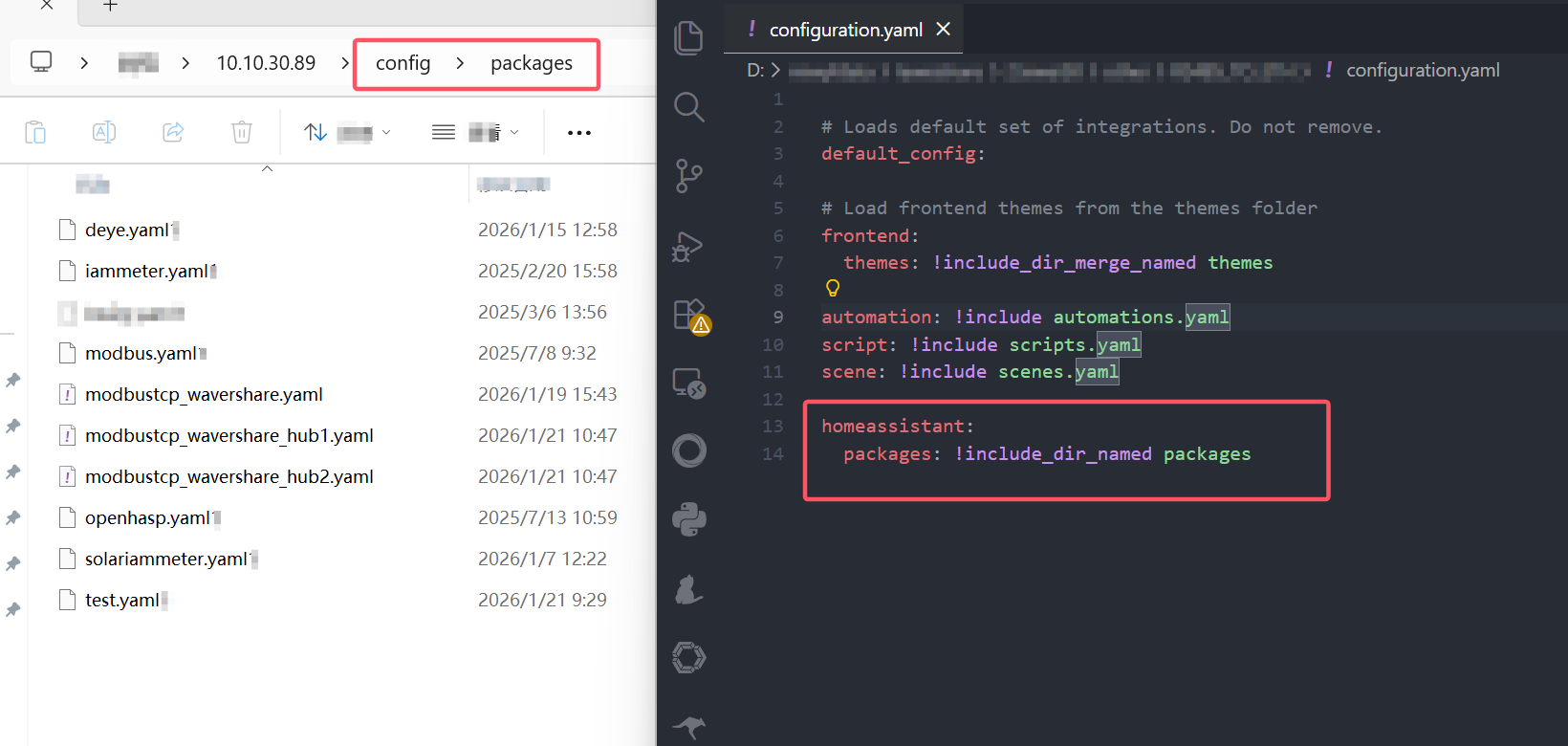
If you have many configuration files, you can use packages. This allows you to separate the device configurations for various functions into individual YAML files. Add the following to configuration.yaml:
homeassistant:
packages: !include_dir_named packages
Create a folder named "packages" in the HA's config directory and put the individual function's YAML configuration files inside, such as mqtt_light1.yaml and modbus_sw1.yaml.
See the screenshot below.
Here's the More Advanced settings screen
Regular setting: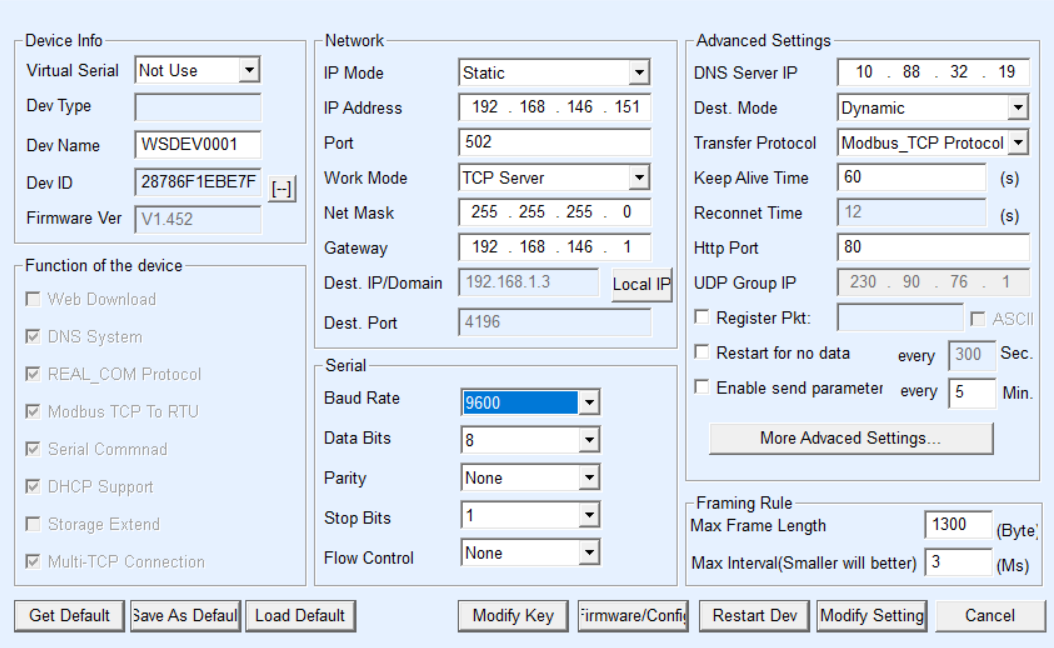
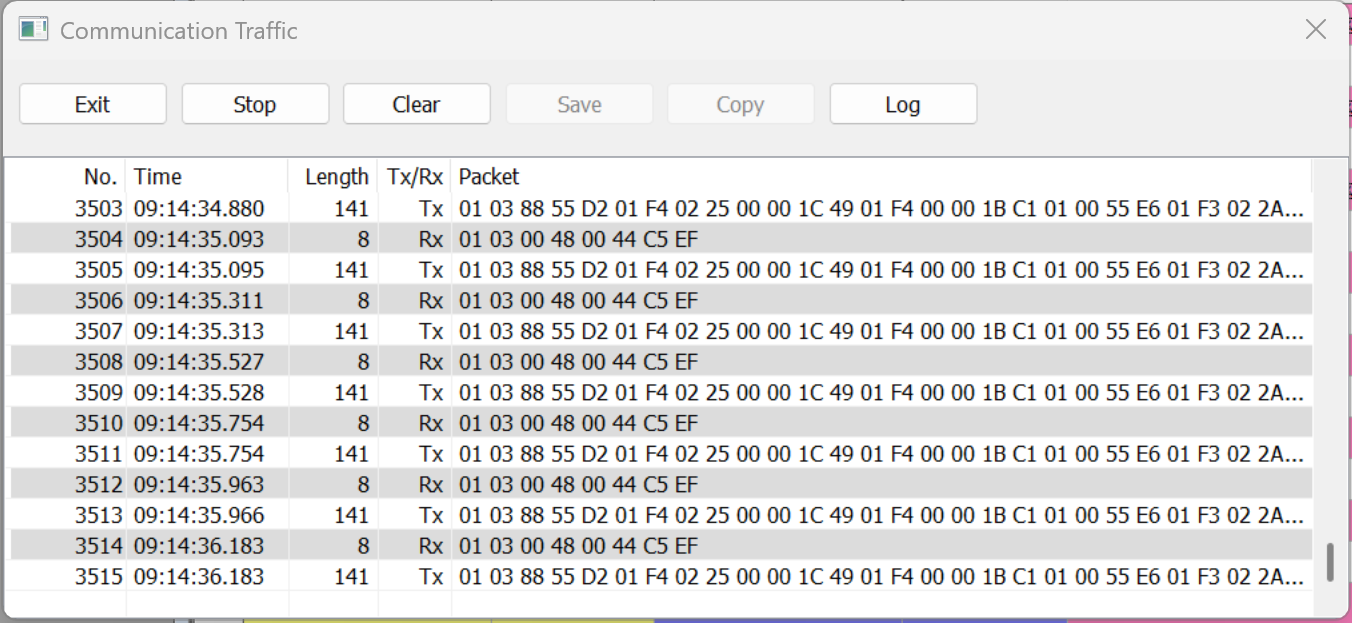
You can use the Modbus pull tool to test whether you can actually retrieve the data.
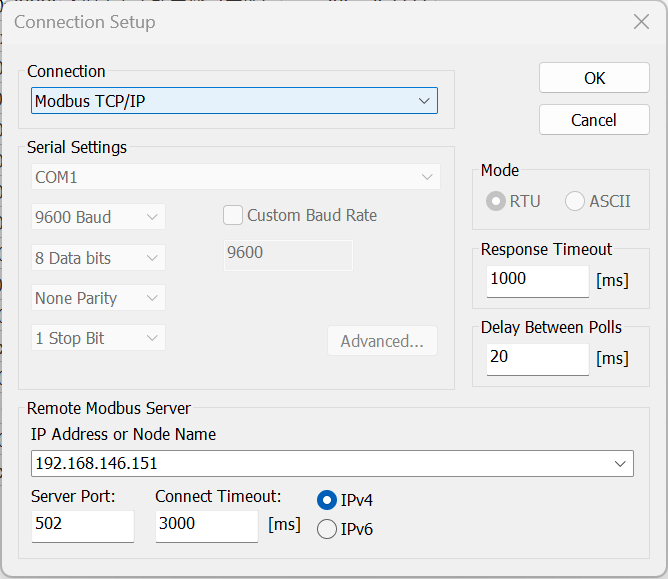
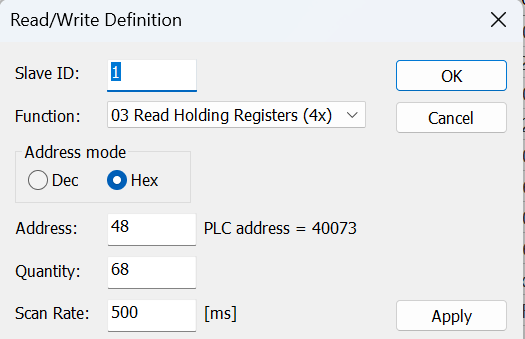
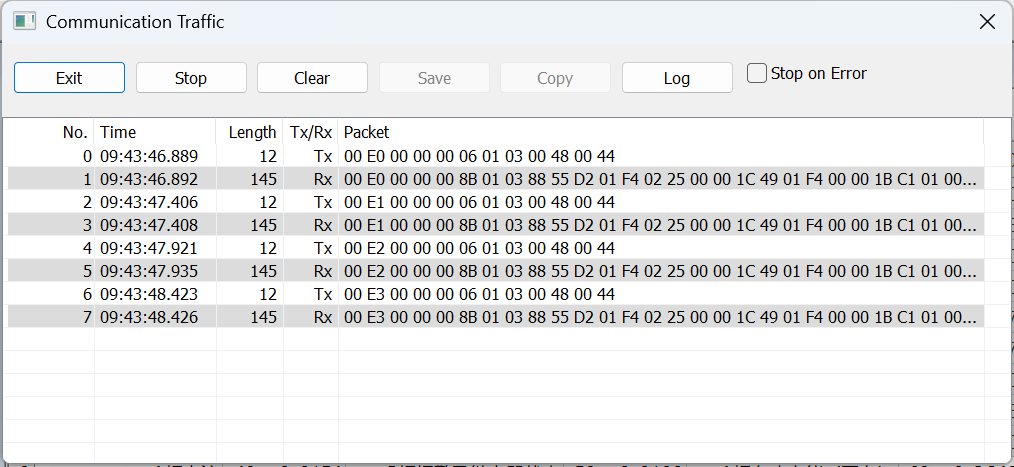
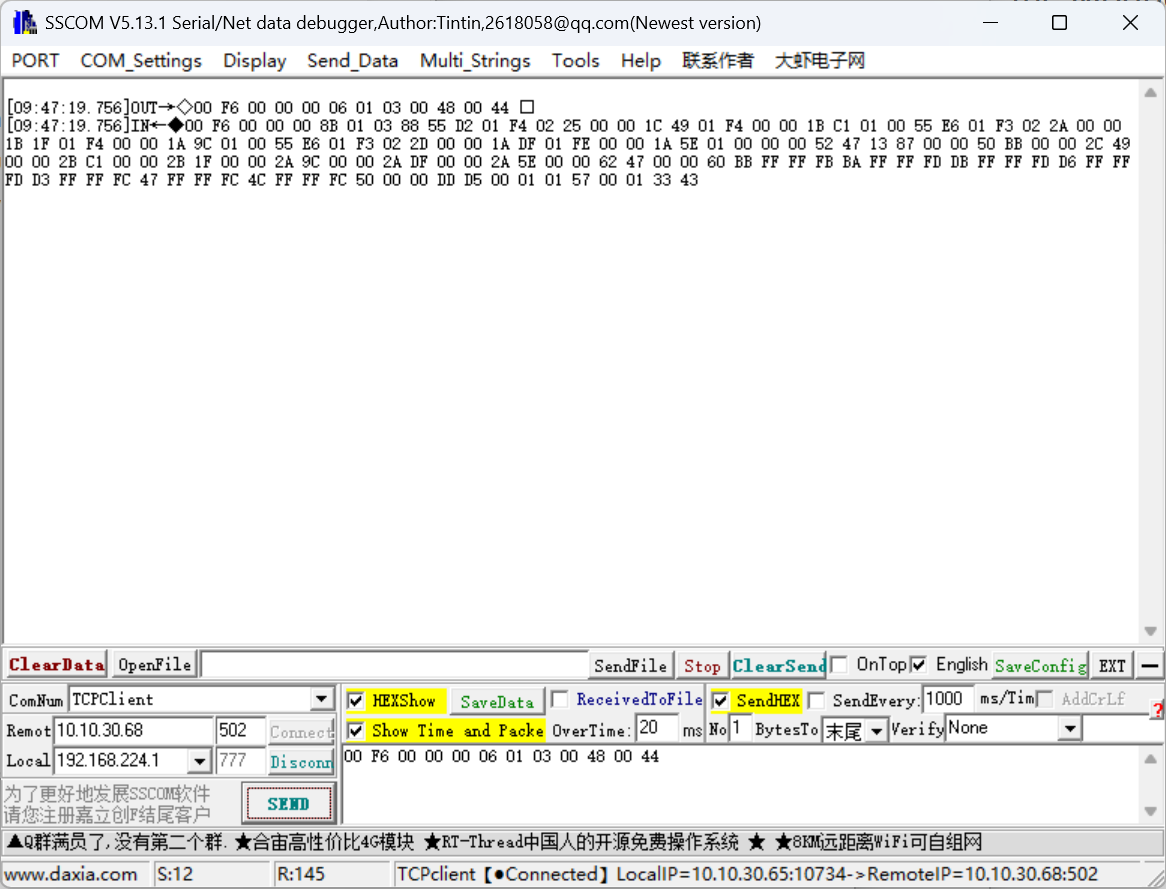
Alternatively, you can use the debugging tool provided by WaveShare: Sscom 5.13.1
https://files.waveshare.com/upload/b/b3/Sscom5.13.1.zip
ComNum: TCPClient
Remot: 192.168.146.151
port: 502
HEXShow/SendHEX
then connect and send data
SEND: 00 F6 00 00 00 06 01 03 00 48 00 44
Good news! We've made major progress. Turns out the problems were configuration issues between the VLANs. I am now talking to the meter however I'm still having a little bit of trouble.
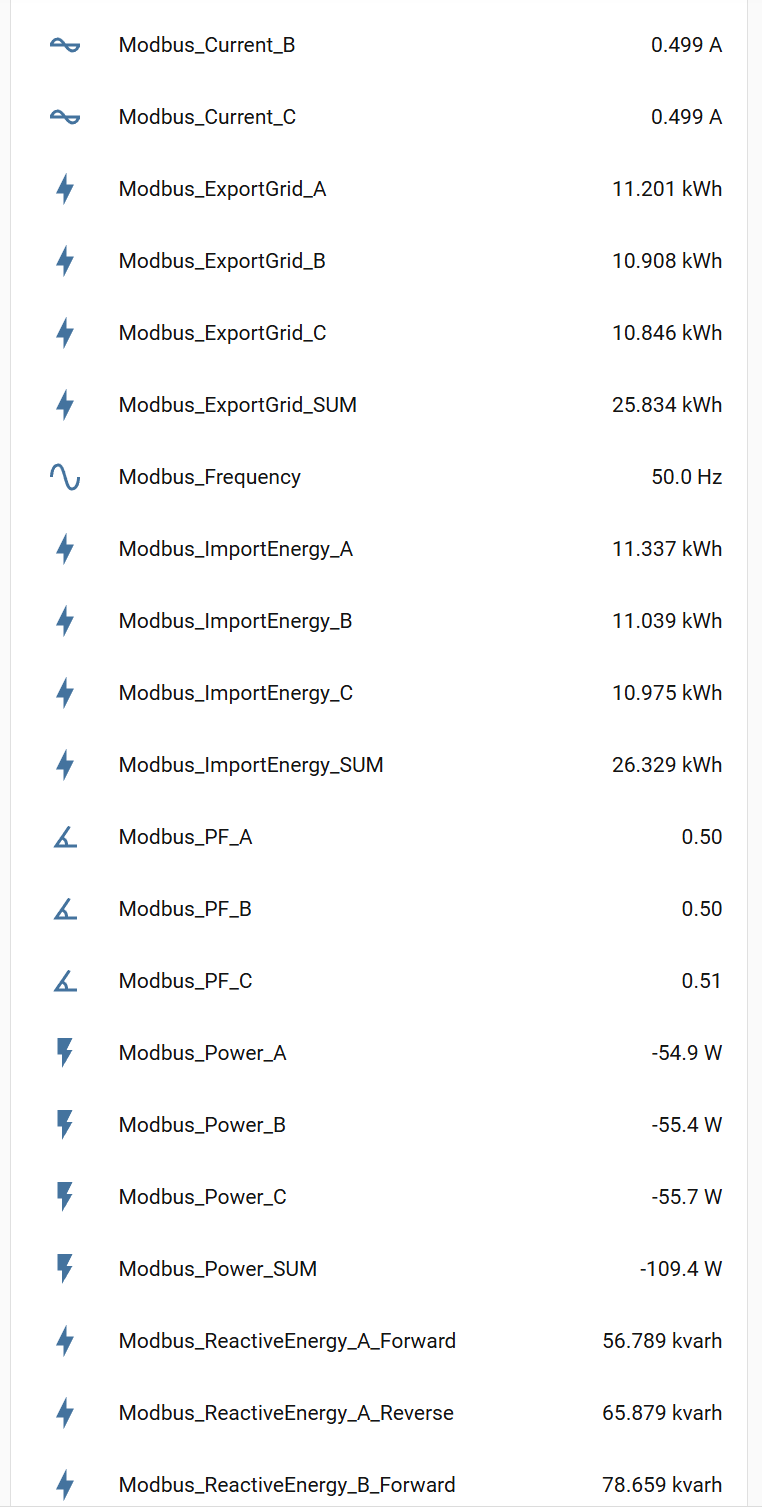
All three voltage sensors and frequency are working with the right values (480V 3 phase bus reading around 278V on each phase). But all of the current channels read zero (and by extension all of the computed channels from current like power, and energy). If the CT's are installed backwards will the meter report negative current?
Lastly, is there any chance you could release a WEM3046T HACS integration? I tried using the 3080T and it talks to the meter but the register map must be different because the values it reports are hilarious. The HACS module would greatly simplify my administration tasks since I'm planning to run 80 power meters at this location alone.
There is no negative value for current, but there is power. If the CT reverse power will display a negative value, the corresponding exportgrid, reverse and other accounting amounts
As for whether the integration of hacs will be released, because there is a relatively conflict between the read register and the need to set the CT ratio and the function of the previous device itself integration. The specific situation needs to be discussed with my colleagues.
I enabled displaying the export energy value and indeed it's reporting power there, so I'll have the electrician reverse the sensors.
A HACS module for the meter would really be sweet. You'd need to have a space to enter the CT calibration for each meter as not all my meters will use the same CT value (ie a global setting won't work).
Is it possible to have a variable in the YAML file? For example since the entity doesn't display the name field at the top of the configuration, but only the sensor name, ie modbus_voltage_A could I put in a variable in place of modbus and then declare the name of the sensor B4_A1 and have it automatically populate that name across all of the sensors (I'd create a different file for each meter)? I'm concerned i'll make mistakes if I have to type that all by hand for all 81 meters.
You could try using AI to create a batch YAML generator that can generate custom names. However, I have a question: will there be any issues with HA reading 81 devices via Modbus TCP? Will it cause HA to lag? I haven't read so many devices before. Then I noticed that the Waveshare (RS485_TO_ETH) DTU seems to support MQTT; I'll investigate whether it's possible to connect to HA via MQTT.
Good news, I'm able to read all of the sensors now but I have another question about a computed channel Modbus_Power_SUM. When using only delta power load the meter isn’t reporting actual power consumption because the supply and return current are cancelling out and even reporting a slightly negative value. Is there a config problem or does this reported value work differently than I think. I'd like to report the actual power consumption.
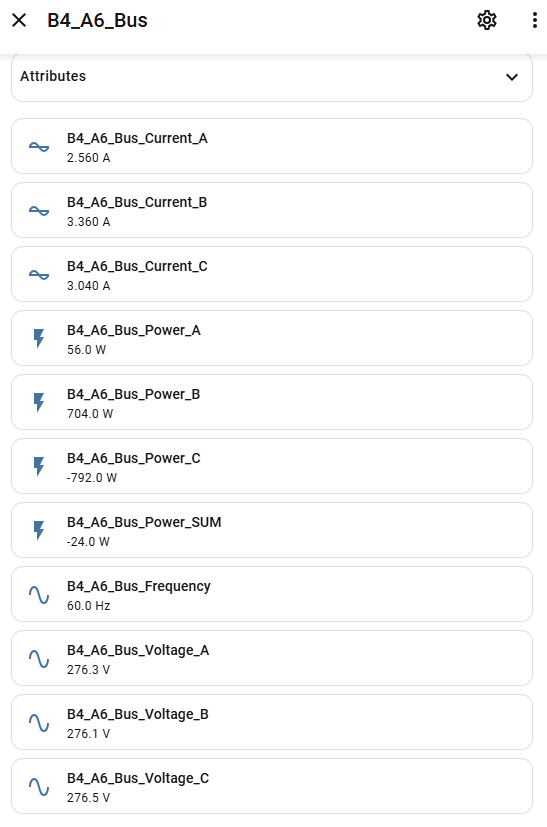
Here you can find information about NEM: https://www.iammeter.com/docs/net-energy-meter
This is a small tool I wrote that generates Modbus TCP configuration with one click.
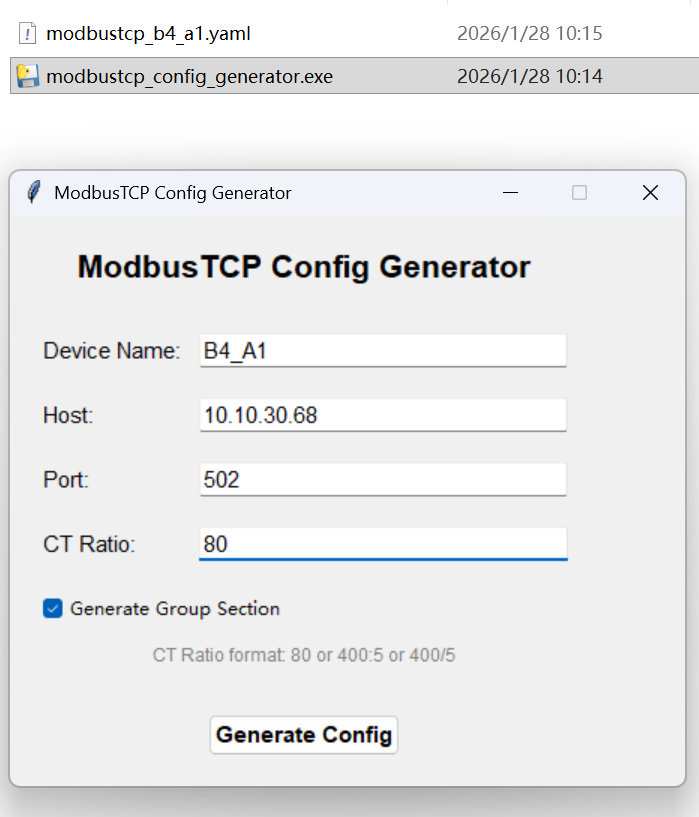
modbustcp_config_generator.exe
Can NEM be enabled on the 3046T?
My loads are always either phase to phase or phase to neutral depending on what equipment we are building at the time.
Thanks for the config generator tool. I was using a python script on my end to do more or less the same thing. Ability to set the CT ratio is useful since I plan on using a mix of 400/5 500/5 and 800/5

Hi,
You case do not need to consider about the NEM function.
Please check wehther the CTC is clamped in a wrong direction.Its K->L direction need to be from the power supply to the load.
Yesterday we reversed the CT on phase C, but afterwards it still read negative, and then Phase A started also reading negative. When we turned the load down Phase A started reading positive again. What else could cause this behavior?
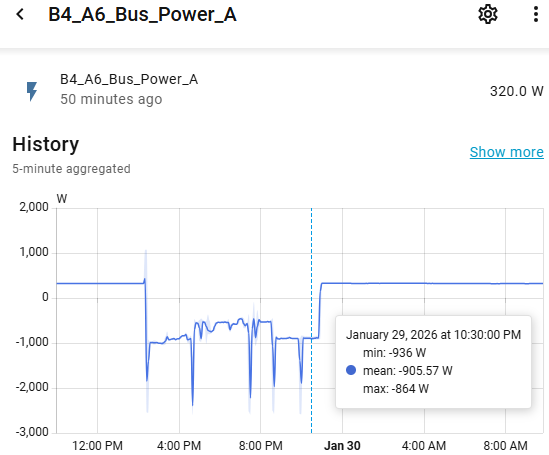
Looking at the data more closely the current is rapidly cycling between positive and negative. The electrician hasn't had a chance today to open up the enclosure so I haven't looked at it but this makes me think the sense lines aren't connected to the same phases as the CTs
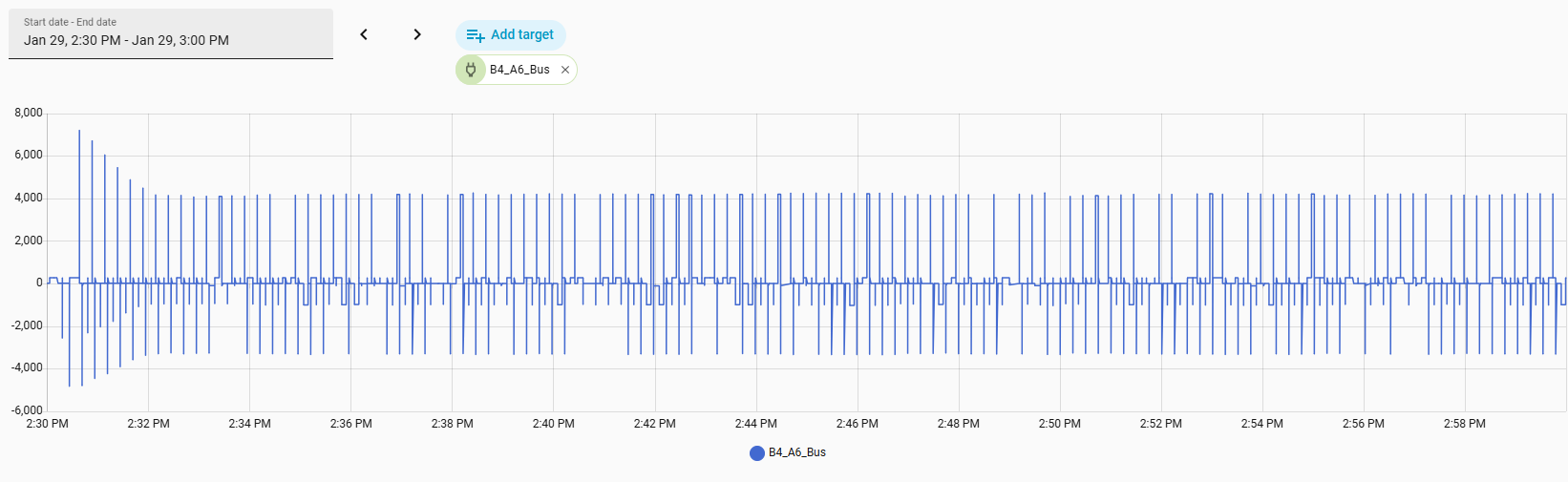
Disregard that last post, I had the wrong graph up. My bad. But still I wonder if the phases are aligned and I will check that as soon as I can get the circuit powered down and opened up.
Yes,please make sure
1 CT (K-L) follow the direction from power supply to the load,like this
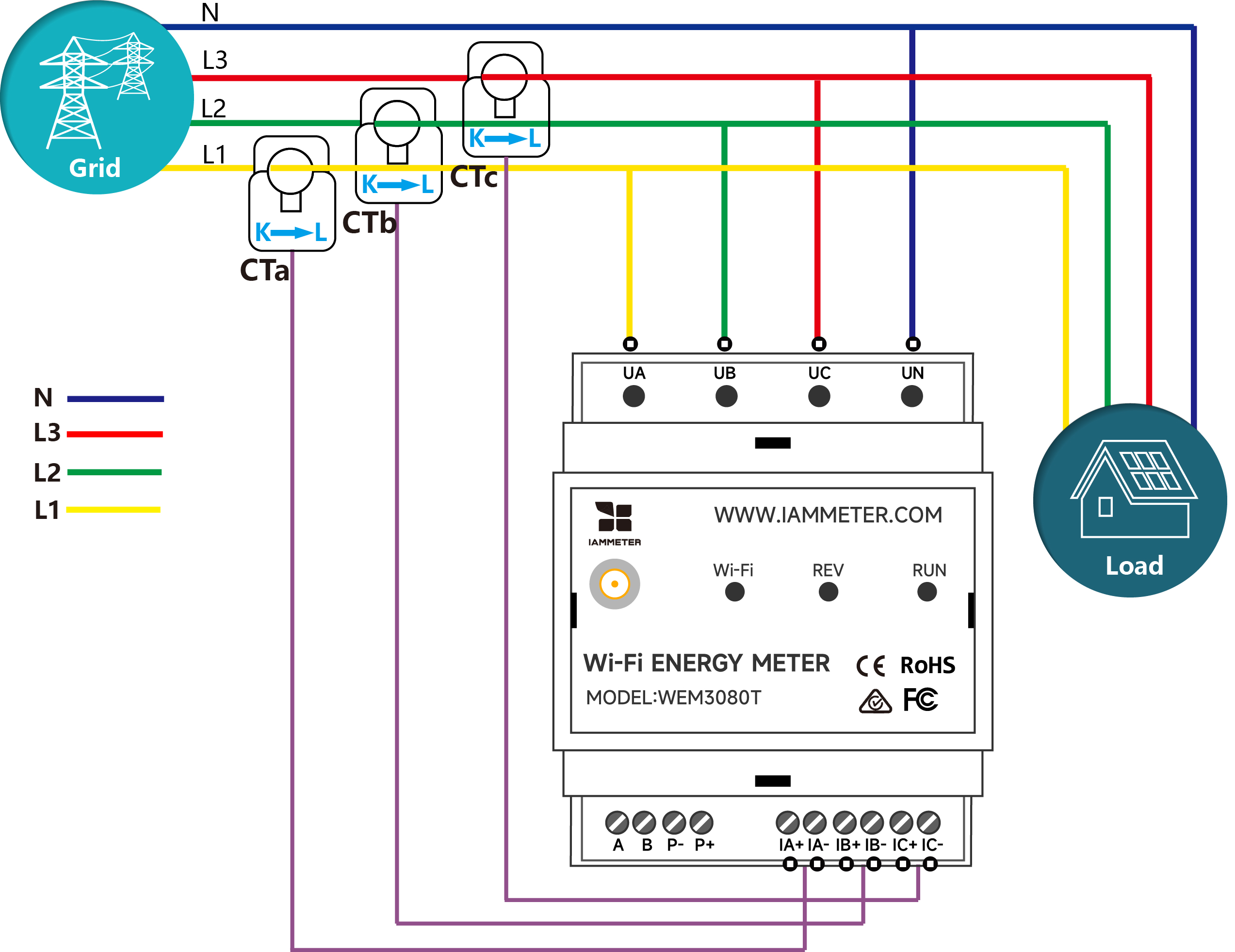
2 phase matched correctly, the phase of CT and voltage supply aligned correctly
Good news! The electrician let me rewire it this morning and now the meter is working perfectly.