

IAMMETER Firmware Release i.91.061
https://www.iammeter.com/newsshow/firmware-upgrade-202509
New Features
Applies to: All IAMMETER meters (except early WEM3162 models) and WPC3700
- Support for WPA3/WPA2/WPA1 Wi-Fi security protocols
- WPC3700 Auto Mode now supports selecting the total power of IAMMETER three-phase meters
- Bug fix for WPC3700 mode selection
- Home Assistant Auto-Discovery: added Net Energy Metering (NEM) results when enabled
- For WEM3046T: new API for setting CTratio, allowing direct CT ratio configuration in the meter. The device can now output real power and energy values directly, without requiring platform-side adjustment.
- Added a runtime register in Modbus/TCP protocol (address 0x40, length 2)
Can you please document the register here? What's the actual value? A seconds counter?
On the WEM3050T, my meter would lock up after about 15 hours running i.91.061.
It would stop sending data to mqtt, and the REV LED would start flashing.
I have downgraded to i.76.058.8.
Please let me know your specific setting.
1 Whether you use mqtt to your own borker or HA mqtt? if using HA mqtt, whether you enable HA discovery?
2 whether the web server of the energy meter is still accessible when the mqtt uploading stop.
3 what is upload interval have you set?
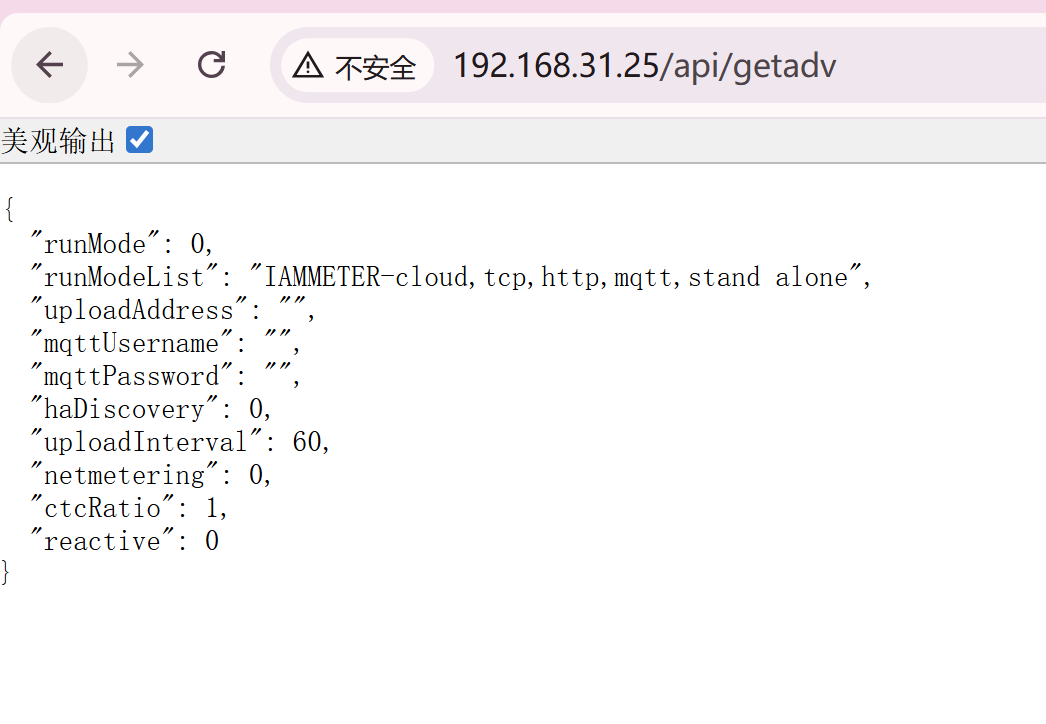
if possible ,please call this api
http://{local IP}/api/getadv
and give me the snapshot of the return value,like this pic below.
OK, we will updated this article this week.
Yes, it indicate the run time in unit of "second"
I replied via email.
Thanks for your excellent support.
I have a three phase WEM3080T meter, but this update is not showing up when checking for new version. I managed to me update manually, but when checking for a newer version in then shows me the previous version again to update to
Is this version not meant for WEM3080T?
Hi,
I think the page you mentioned is this one, correct?
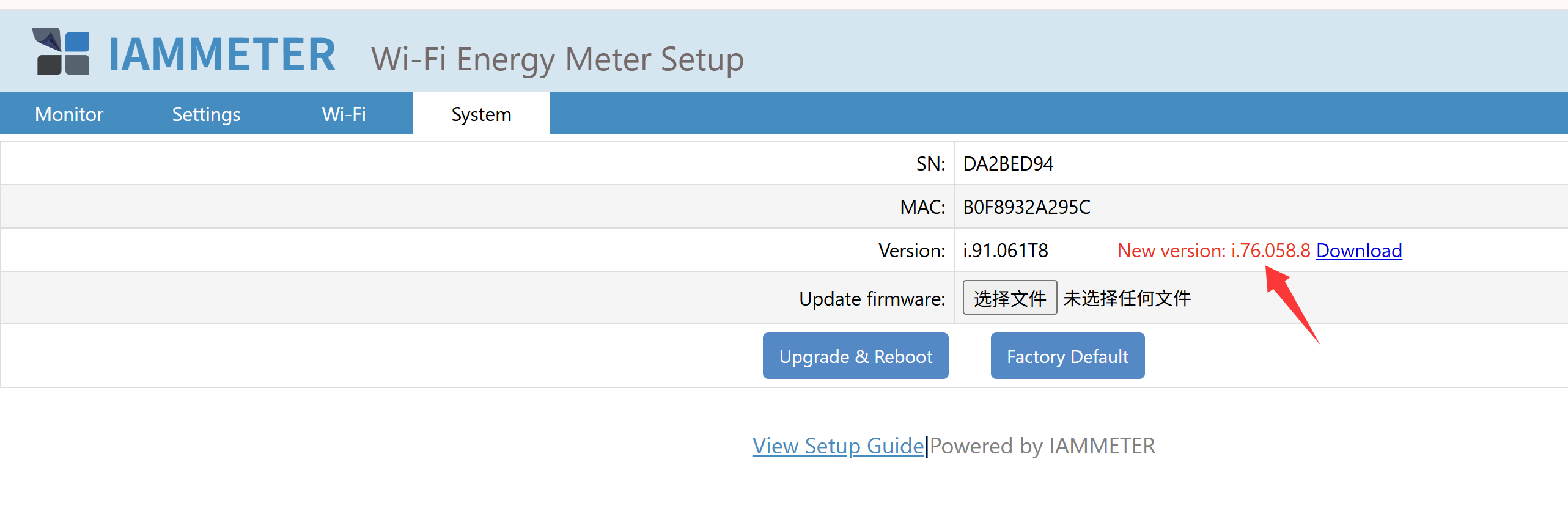
The firmware version i.91.061 is fine for WEM308T.
We did not replace the .bin file on that page because upgrading would cause the device to lose its Wi-Fi credentials, and customers would need to set them again. To highlight this issue, we published a notice here:
https://www.iammeter.com/newsshow/firmware-upgrade-202509#important-notice-wi-fi-must-be-reconfigured-after-upgrade
If we directly replaced the latest version on that page, some users might try to upgrade without realizing this limitation. For example, if their device is installed at a remote site and only accessible via VPN, they might be unable to reconfigure the Wi-Fi credentials after the upgrade.
That’s the reason why we do not directly replace the version on that webpage.
If you want to upgrade to the latest version, please download the .bin file from here and upgrade after confirming you are able to reconfigure the Wi-Fi credentials:
https://www.iammeter.com/newsshow/firmware-upgrade-202509
Okay, makes sense for people still on the i.76.xxx version to not lose wifi connectivity.
But once updated to i.91.xx version, will the next versions be able to update again automatically through the "check update" button or new updates from now on always require to reconfigure wifi?
https://www.iammeter.com/newsshow/firmware-upgrade-202509#important-notice-wi-fi-must-be-reconfigured-after-upgradeIf we directly replaced the latest version on that page, some us
Hi,
Once you update to the WPA3 version, the device will no longer lose its Wi-Fi connection when upgrading to future versions.
The Wi-Fi disconnection issue (requiring reconfiguration of Wi-Fi credentials) only occurs when upgrading from the WPA2 version to the WPA3 version.
Okay, because when after manually updating to the WPA3 version and checking for updates it now offers me to update back to the WPA2 version: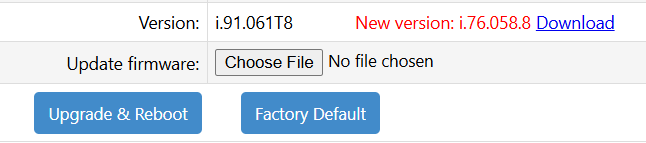
I assume this is, because you still haven't replaced the .bin file for that update feature. But it would makes sense to add check that if the current version is already WPA3, it shouldn't offer the WPA2 update.
Just wanted to remind you to document the runtime register..
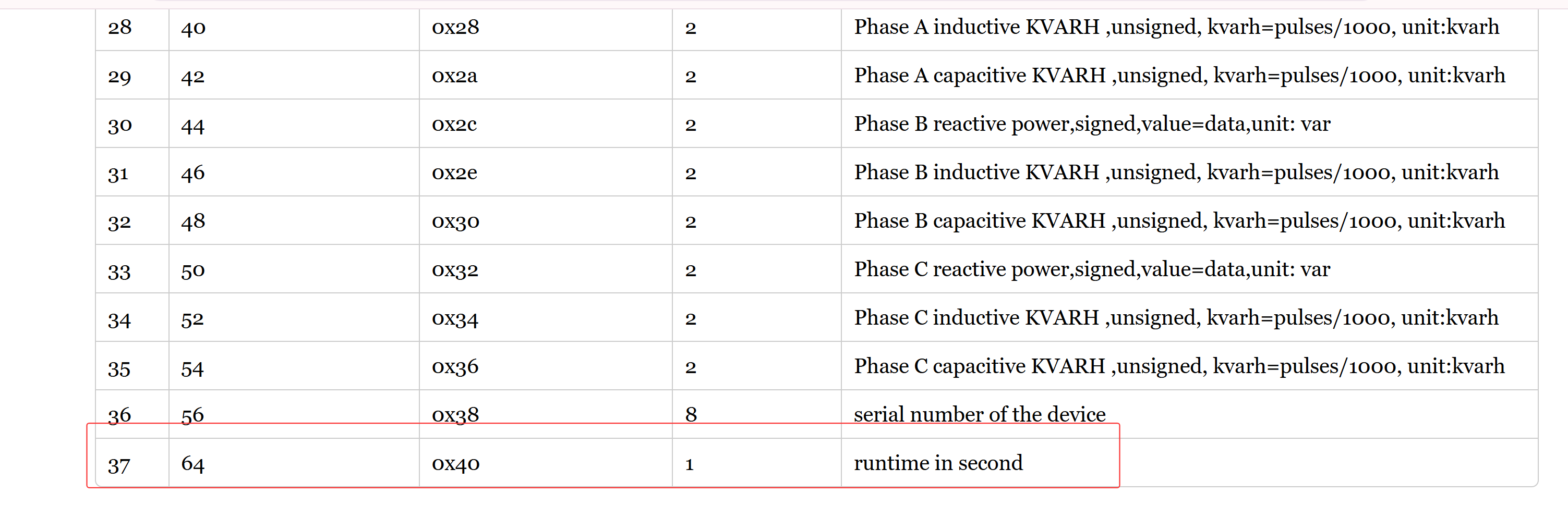
Thanks for your remind, it has updated now.
I would have documented it as follows:
Uptime of measured load in seconds (reverts to 0 in case voltage drops to 0)
Is that actually correct?
correct